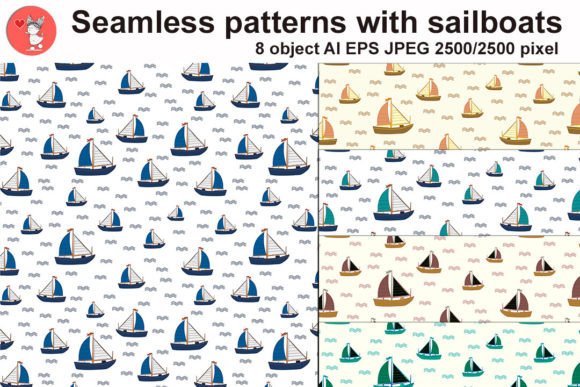
Seamless Patterns with Sailboats
When you are looking to add a touch of the ocean to your creative projects, finding the right texture can be the difference between a design that feels generic and one that truly captures a mood. Seamless Patterns with Sailboats offers a specific nautical aesthetic that goes beyond simple clipart. This collection is designed for creators who want high-quality, repeatable backgrounds that integrate perfectly into packaging, textiles, and digital layouts without visible breaks or awkward edges.
The appeal of this pack lies in its versatility. Whether you are a small business owner creating eco-friendly soap labels, a textile designer launching a summer swimwear line, or a blogger needing unique headers, having access to professional-grade nautical motifs saves hours of manual editing. However, simply downloading a pattern file does not guarantee success. Many users overlook critical technical details when selecting vector assets, leading to pixelated prints or files that cannot be edited efficiently. Understanding what makes this specific collection valuable—and how to use it correctly—is essential for achieving professional results.
Understanding the Value of Vector and Raster Formats
One of the most common mistakes beginners make is assuming all image files are interchangeable. In this specific pack, you will find two distinct folders: one containing JPEG templates at 2500 by 2500 pixels and another containing EPS templates alongside a single AI file. Confusing these formats can severely limit your project's outcome. If you attempt to scale a JPEG up for a large-format banner, you will inevitably encounter pixelation, ruining the crisp lines of the sailboats.
To avoid this, always start with the EPS or AI files if your project requires resizing. These vector formats allow you to stretch the pattern to any dimension while maintaining perfect sharpness. The 2500-pixel JPEGs are excellent for web use, social media graphics, or quick mockups where file size matters more than infinite scalability. A practical approach is to keep both versions on hand: use the vector files for print production and the high-resolution JPEGs for digital presentations. Ignoring this distinction often leads to costly reprints or blurry digital assets that damage your brand's reputation.
Navigating File Compatibility Issues
Another area where creators often stumble is software compatibility. While the pack includes a common AI (Adobe Illustrator) file, not every design tool handles proprietary Adobe formats equally well. If you are using free alternatives like GIMP, Inkscape, or Canva, opening an .AI file directly might result in missing layers or flattened images that are difficult to edit.
The smartest solution is to convert the AI file to an EPS format before importing it into non-Adobe software. Most vector programs handle EPS universally. By doing this conversion first, you ensure that the individual elements of the sailboat patterns remain editable. If you skip this step, you might end up with a static image that forces you to recreate the pattern from scratch, wasting valuable time. Always check your workflow requirements before purchasing or downloading any asset.
Maximizing Versatility Across Different Media
A frequent misconception about seamless patterns is that they are only suitable for wrapping paper or fabric. While those are classic uses, the Seamless Patterns with Sailboats collection opens doors for much broader applications. Entrepreneurs often miss the opportunity to use these textures for branding consistency across diverse mediums.
Consider a scenario where you are launching a new product line. Using the same nautical theme on your physical packaging, your website background, and your email newsletters creates a cohesive brand identity. However, many designers fail to adjust the color palette or density of the pattern for different contexts. A busy pattern that looks great on a white t-shirt might overwhelm a product label if used at full opacity. To correct this, test your patterns in grayscale or reduce their opacity before finalizing the design. This ensures the text remains legible and the overall composition does not become visually chaotic.
Ensuring Print Quality and Color Accuracy
For professionals preparing designs for commercial printing, the color mode is a critical detail that is frequently overlooked. Digital screens display colors in RGB (Red, Green, Blue), while printers require CMYK (Cyan, Magenta, Yellow, Key/Black). If you download a pattern and assume the colors will match exactly when printed, you risk ending up with dull, muddy tones instead of vibrant blues and whites.
The best practice is to convert your final design to CMYK before sending it to the printer. Since this pack provides high-quality vectors, you have the flexibility to tweak the colors easily within your vector editor. Take the time to create a color swatch library based on the patterns in the zip file. This allows you to maintain consistency across multiple projects and ensures that the "nautical" feel remains true to your vision, regardless of the material it is printed on.
Evaluating the Collection Before You Commit
Before integrating these assets into your workflow, it is wise to evaluate the specific needs of your current projects. Are you looking for a subtle background or a bold, dominant texture? With eight distinct patterns included, there is likely an option for every need, but choosing the wrong one can disrupt the visual hierarchy of your design.
- Check the Scale: Ensure the repetition of the sailboats matches the size of your canvas. A pattern meant for a small notebook cover might look cluttered on a large wall mural.
- Review the Complexity: Some patterns may feature intricate rigging details, while others might focus on the silhouette of the boat. Match the complexity to your audience; detailed illustrations work well for educational materials, while simplified shapes are better for modern minimalist branding.
- Verify Licensing: Always read the usage terms provided by the creator, Tatiana. Even though these are ready-to-use templates, some licenses restrict commercial resale or limit the number of end products.
By taking these steps, you avoid the frustration of realizing too late that a pattern doesn't fit your project scope. The goal is to enhance your work, not complicate it.
Practical Tips for Efficient Workflow
To get the most out of this collection, organize your workspace effectively. When you unzip the file, do not leave the folders mixed together. Create a dedicated folder for your active projects and copy the relevant vector files there. This prevents accidental overwrites and keeps your source files clean.
Furthermore, consider grouping the layers in your design software immediately after opening the AI file. Naming layers like "Sailboat Main," "Water Waves," and "Sky Background" allows you to isolate elements later if you decide to change the color scheme or remove specific components. This level of organization is what separates amateur designs from professional ones. It also makes collaboration easier if you are working with a team or handing off files to a freelancer.
Finally, remember that creativity thrives on experimentation. Don't be afraid to combine different patterns from the set. Mixing a subtle wave pattern with a bold sailboat motif can create a dynamic texture that stands out. Just ensure that the contrast is balanced so that neither element competes aggressively for attention. With the right approach, Seamless Patterns with Sailboats becomes more than just a decoration; it becomes a foundational element of your brand's story.