Fall Ombre Leaves Seamless Patterns: A Practical Guide to Elevating Your Autumn Crafts
There is a specific kind of magic that happens when the crisp air hits your cheeks and the trees begin their slow transformation into gold, rust, and crimson. For creators, entrepreneurs, and hobbyists alike, capturing that essence digitally can be the difference between a project that feels "good enough" and one that looks professionally designed. This is where Fall Ombre Leaves Seamless Patterns become an essential asset. These digital assets are not merely decorative; they are foundational tools that allow you to replicate the warmth of the season across various mediums without the mess of physical crafting.
However, simply downloading a file labeled "fall leaves" does not guarantee success. Many users find themselves frustrated by pixelated prints, patterns that don't align on tumblers, or colors that clash with their brand identity. The issue often lies not in the concept of ombre gradients, but in the technical specifications and the intended application of the files. Before you commit to a purchase or start designing, it is crucial to understand what makes a high-quality seamless pattern versus a low-resolution image that will ruin your final product.
The Critical Importance of Resolution and Dimensions
One of the most common pitfalls in the world of digital crafting is overlooking the resolution requirements for printing. You might see a beautiful preview of Fall Ombre Leaves Seamless Patterns on a screen and assume it will look equally sharp on paper or fabric. This assumption is frequently incorrect. Screens display images at 72 dpi (dots per inch), while professional printing requires 300 dpi to ensure crisp edges and smooth color transitions.
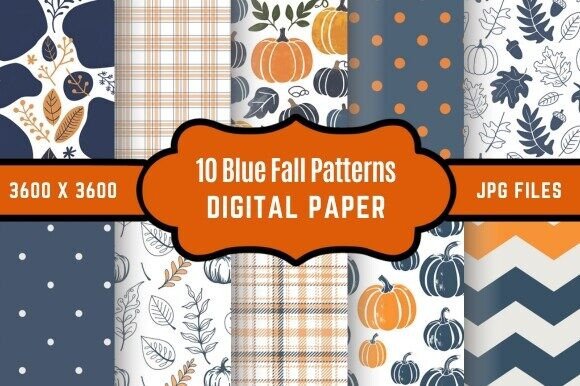
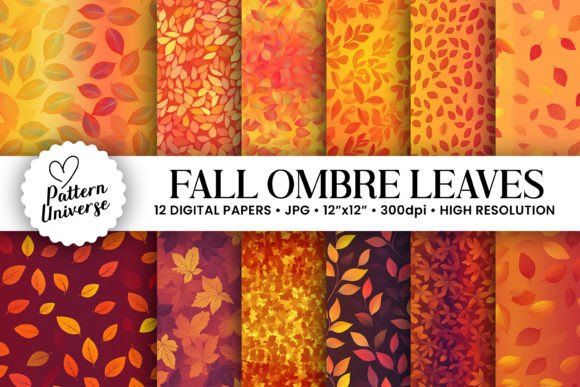
If you attempt to print a low-resolution image, the result is often blurry or blocky, especially when scaling up. This mistake is particularly costly for small business owners selling greeting cards or wrapping paper, as poor print quality can lead to customer returns and damaged reputation. To avoid this, always verify the file dimensions before downloading. The ideal package includes files sized at 3600 x 3600 pixels, which translates perfectly to 12″ x 12″ at 300 dpi. This size is the industry standard for scrapbooking, card making, and sublimation projects, ensuring that every leaf gradient remains sharp regardless of how large you scale the design.
Understanding Seamless Loops vs. Single Images
A second area where beginners often stumble is confusing a single image of a leaf with a true seamless pattern. A single image cannot be tiled infinitely without visible breaks. If you try to wrap a tumbler or cover a large tablecloth with a non-seamless image, you will see distinct lines where the image repeats, ruining the aesthetic flow. True seamless patterns are mathematically engineered so that the left edge connects perfectly with the right edge, and the top connects with the bottom.
This feature is vital for applications like tumbler wraps, where the design must curve around a cylinder without interruption. When evaluating a set of Fall Ombre Leaves Seamless Patterns, test the loop by copying and pasting the image next to itself. If you see a hard line or a sudden jump in the gradient, the pattern is not truly seamless. Our collection ensures that these loops are flawless, allowing you to create continuous backgrounds for websites, invitations, or gift wrapping that look custom-made rather than mass-produced.
Selecting the Right Gradient for Your Project
The term "ombre" refers to a graduated blending of color from light to dark or from one hue to another. In the context of autumn, this usually means transitioning from pale yellows to deep oranges, or soft greens to rich browns. While this effect is visually stunning, choosing the wrong ombre direction or intensity can negatively impact readability and usability.
- For Text Overlays: If you plan to add text for invitations or social media graphics, ensure the ombre background isn't too busy. High-contrast gradients can make white or light-colored text difficult to read. Look for patterns where the leaves fade gently into the background, providing a canvas rather than a distraction.
- For Sublimation: When using these designs for tumblers or mugs, consider the base color of the item. An ombre pattern that relies heavily on white or light gray may not show up well on a dark-colored tumbler. Conversely, very dark gradients might get lost on black items. Always check the color palette of the Fall Ombre Leaves Seamless Patterns against your intended substrate.
- For Scrapbooking: Balance is key. If your photos have warm tones, a cool-toned ombre leaf pattern might create a jarring contrast. Stick to complementary color schemes to maintain a cohesive look in your albums.
Maximizing Versatility Across Media
The beauty of owning a comprehensive set of Fall Ombre Leaves Seamless Patterns lies in its versatility. However, many creators limit their usage to just one type of project, such as printing greeting cards. By understanding the full potential of these digital papers, you can expand your offerings significantly.
Consider the workflow for a small business owner. Instead of buying separate clipart and backgrounds, having 12 high-resolution digital papers allows you to:
- Create unique gift wrapping for holiday sales without needing a printer capable of massive rolls; simply print on standard paper and cut.
- Design greeting cards and envelopes that match perfectly, creating a unified brand experience for your customers.
- Produce tumbler wraps that fit standard 20oz and 30oz cups with precision, reducing waste from misaligned prints.
- Develop digital backgrounds for blogs, webinars, or virtual events, adding a touch of seasonal professionalism instantly.
- Enhance scrapbook layouts with textured, organic elements that feel hand-crafted but are easy to layer.
What to Check Before You Download
To ensure you are making the best decision for your creative needs, take a moment to review the package details. A high-quality download should be organized efficiently. You want to avoid sifting through disorganized folders filled with duplicates or low-res previews. A well-curated package, like the one described here, delivers 12 Digital Papers within a single zip file. This organization saves time and keeps your workspace tidy.
Furthermore, verify the format. Standard JPEG or PNG formats are typically sufficient for most design software like Adobe Photoshop, Illustrator, Canva, or Cricut Design Space. Ensure the files are delivered in a way that preserves transparency if necessary, though for seamless backgrounds, solid edges are standard. Finally, check the licensing terms. Most commercial-grade digital papers allow you to use them in your own products for sale, but some restrict resale of the raw digital files themselves. Understanding these boundaries protects your business from legal issues down the line.
Conclusion: Making the Right Choice for Your Creativity
Crafting with digital assets should be about enhancing your creativity, not fighting with technical limitations. By focusing on high-resolution files, true seamless loops, and appropriate color gradients, you set yourself up for success. Whether you are a seasoned graphic designer looking to streamline your workflow or a beginner eager to make your first handmade gift, the right Fall Ombre Leaves Seamless Patterns provide the foundation you need.
Don't settle for blurry prints or repetitive, broken designs. Invest in a collection that offers High-Resolution 300dpi files in the perfect 12″ x 12″ size. With 12 unique variations ready to go, you have everything you need to bring the beauty of autumn to life in your next project. Take the time to evaluate your needs, choose the right specifications, and watch your craft projects transform from ordinary to extraordinary.